

Privacy hacks
You should have by now a pretty good VPN. However, you can make it even better with some small tricks to achieve even more privacy. As usual, I will show you first how to do it manually, and in the end how to do it automatically using one of my scripts.
Add custom nameservers to /etc/resolv.conf file
A VPS that requires internet access must have a mechanism for translating domain names used by humans into IP addresses used by computers. On my VPS the systemd-resolved service is used for that purpose, but as explained in local bridge setup, the systemd-resolved conflicts with dnsmasq and it has to be disabled. In order to fix that and add custom nameservers you have to install resolvconf.
sudo apt install -y resolvconf
If you followed the steps in local bridge setup article, you have already set up custom DNS servers from Quad9 and Cloudflare in dnsmasq. dnsmasq will provide DNS services for VPN clients. However, there are other services on the VPS that require DNS services for internet access. By adding custom nameservers from Quad9 and/or Cloudflare to /etc/resolv.conf file, you can achieve more privacy, since they claim not to log DNS queries on their servers.
After installing resolvconf, open the file /etc/resolvconf/resolv.conf.d/tail in a text editor.
sudo nano /etc/resolvconf/resolv.conf.d/tail
You can add nameservers from Quad9.
nameserver 9.9.9.9
nameserver 149.112.112.112
And/or nameservers from Cloudflare.
nameserver 1.1.1.1
nameserver 1.0.0.1
Restart resolvconf service to apply the changes.
sudo systemctl restart resolvconf.service
SoftEther VPN log purging
While you can configure SoftEther VPN server to disable packet logs and security logs per VPN hub, SoftEther VPN will still log server logs, and it is not possible to disable this. However, while searching the internet I came across an article on whattheserver.com about SoftEther VPN log purging which can help you to achieve even more privacy with SoftEther VPN server.
In order to purge the logs, you can create a script to purge SoftEther VPN logs and a cron job to run the script every minute.
First open a new file /root/softether-log-purge.
sudo nano /root/softether-log-purge
Add the following lines inside it:
#!/bin/bash
# Script to purge SoftEther logs.
# Copyleft (C) 2025 private-vpn-setup.com - All rights reserved.
# Permission to copy and modify is granted under the CopyLeft license.
# Last revised 2025-11-23.
# Delete SoftEther packet logs.
truncate -s 0 /usr/local/softether/packet_log/*/*.log
cd /usr/local/softether/packet_log/; find -name '*.log' -delete
# Delete SoftEther security logs.
# Uncomment this section if you want to purge SoftEther security logs.
# Please note that you will not be able to use Fail2Ban [softether-vpn-client] jail!
########################################################
#truncate -s 0 /usr/local/softether/security_log/*/*.log
#cd /usr/local/softether/security_log/; find -name '*.log' -delete
########################################################
# Delete SoftEther server logs.
# Uncomment this section if you want to purge SoftEther server logs.
# Please note that you will not be able to use Fail2Ban [softether-vpn-admin] jail!
########################################################
#truncate -s 0 /usr/local/softether/server_log/*.log
#cd /usr/local/softether/server_log/; find -name '*.log' -delete
########################################################
As you can see, you can also delete the server log files and security log files if you uncomment the two lines in their respective sections. But, you will not be able to use the [softether-vpn-client] jail and [softether-vpn-admin] jail in fail2ban, since these log files are necessary for those jails. So it depends on what you want, more privacy or more security.
However, if you follow the steps in fail2ban article, you can still delete the server and security log files older than 24 hours. fail2ban needs only log entries from the previous 24 hours to find failed attempts.
Press Ctrl x, then y and Enter to save the file.
Make the file /root/softether-log-purge executable.
sudo chmod +x /root/softether-log-purge
Make sure you have cron package installed.
sudo apt install -y cron
Now you can add a new cron job by editing crontab.
sudo crontab -e
Select a text editor.
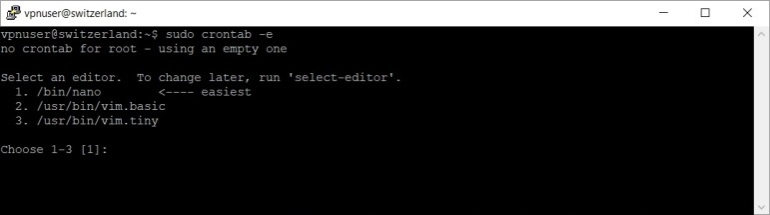
Press 1 to select nano, then press Enter.
Add the following line:
* * * * * /bin/bash /root/softether-log-purge > /dev/null 2>&1
Press Ctrl x, then y and Enter to save the file.
You should now reboot your VPS to apply the new changes.
sudo reboot
As I said in the begining you can use one of my scripts to configure your VPS automatically and achieve more privacy. Download the script first.
sudo wget -nv https://private-vpn-setup.com/downloads/privacy-hacks
Then run the file privacy-hacks.
sudo bash privacy-hacks
If you use my script, you will find the cron job in /etc/cron.d/softether-log-purge file. Should you wish to modify/delete the cron job, just modify/delete the file.